Skip to content

The attendee toolkit

Full rooms.
Familiar faces.
Less busywork.

Know who comes to your events. Give them a reason to come back. Bring ticketing, marketing, and the door together in attendee.

Request access

Audience insights

There’s a person
behind every ticket.

Get to know your first-timers, your regulars, and the people who never miss a show. Bring customer details, order history, and lifetime spend into one view.

  • Customer profiles with purchase history
  • Segments for repeat buyers, VIPs, and lapsed guests
  • Saved audiences that update as people buy
Meet your audience
Customers / All customers

Your audience

Every guest. A little better understood.

Export ↗

All purchasers

1,248

Repeat purchasers

386

VIP

84

CustomerLifetime spend
MC

Maya Chen

maya@example.com

$540.00

6 orders

JL

Jordan Lee

jordan@example.com

$320.00

4 orders

DP

Devin Park

devin@example.com

$255.00

3 orders

Your regulars, ready to reach.

Saved segment · Repeat purchasers

2 or more paid orders386 people
Customers and saved segments · Illustrative product view

Marketing automation

You plan the next show.
We’ll send the follow-up.

Turn guest actions into thoughtful emails. Recover abandoned carts, follow up after a purchase, and reach the right people with scheduled broadcasts.

  • Visual workflows with triggers, waits, and conditions
  • Email broadcasts to consented customer segments
  • Tracking links that connect promotion to ticket sales
Explore your marketing tools

Set the timing.
Make it yours.

Cart recoveryPublished

Checkout abandoned

A guest leaves tickets in their cart

Give them a little time

Wait 30 minutes

Your tickets are waiting

Email a link back to checkout

Stop when the guest buys
Automated cart recovery · Illustrative product view

A workflow you can see.
And make your own.

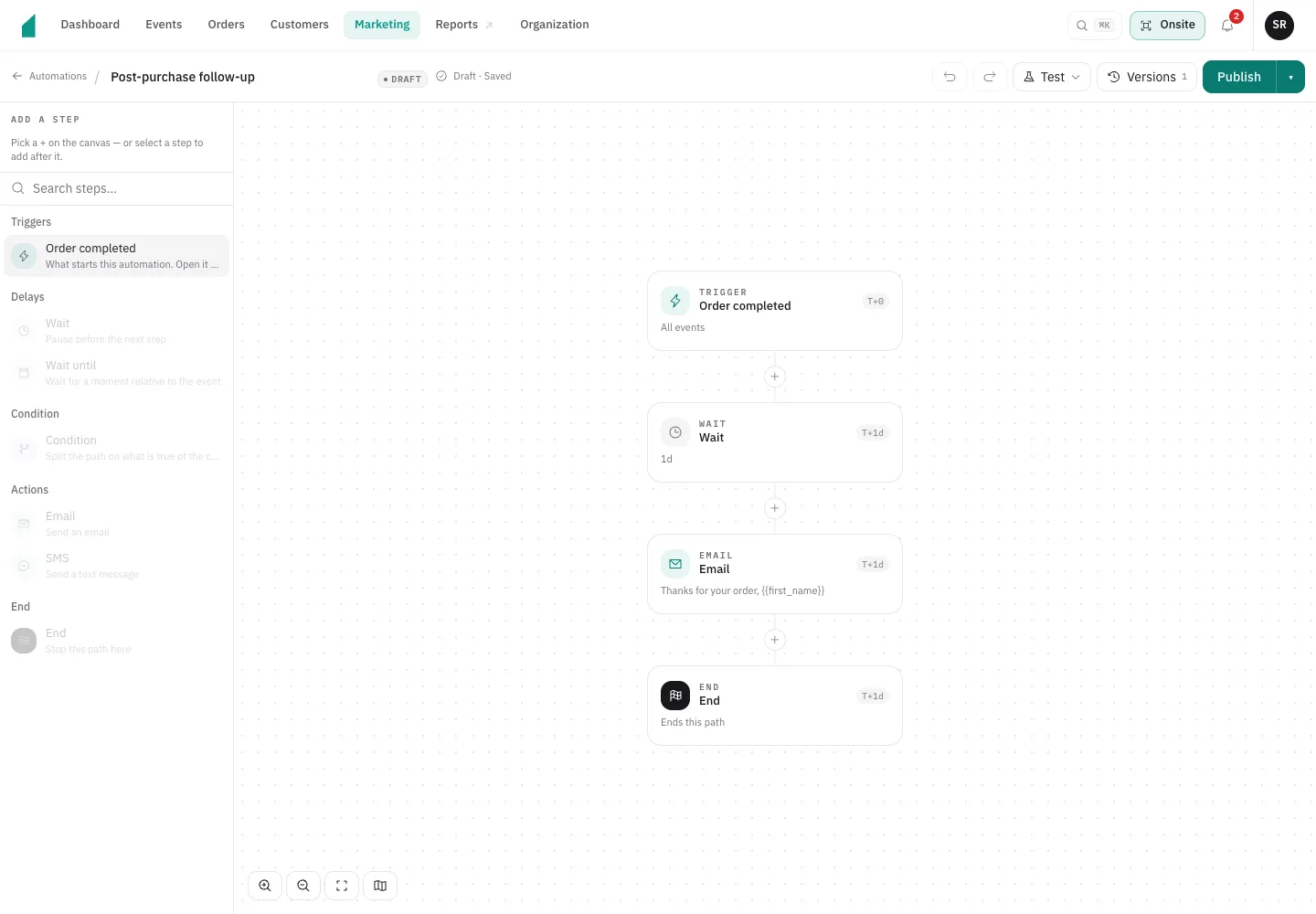
Start with a template, choose what sets it off, and decide what happens next. The visual builder puts each step in front of you before you publish.

Shown here: a post-purchase email, sent one day later.

Post-purchase follow-up

Workflow editor
attendee’s workflow builder showing an Order completed trigger, a one-day wait, a follow-up email, and an end step.
Inside the automation builder · Product screenshot

Ticketing and payments

Make the yes easy.
Keep the money simple.

Your brand at checkout. Your tickets in their pocket. Ticket revenue in your own Stripe account.

An event page that feels like you.

Branded pages, guest checkout, ticket tiers, presale codes, and QR tickets with Apple and Google Wallet passes.

Explore ticketing

Entry Amount
Buyer pays for one ticket $40.00
attendee fee Flat $0.99
−$0.99
You receive before Stripe fees $39.01

Absorb the attendee fee and receive $39.01, or pass it on and receive $40.00, before Stripe processing. Stripe’s processing fee is not included and can also be passed on to the customer.

Your sales. Your Stripe account.

Choose who pays the fees. See each order, refund, and payout in a ledger that accounts for every cent.

Explore payments

On-site operations

Big night.
Small hardware list.

Your phone is the box office. Sell walk-up tickets and accept contactless cards with Tap to Pay. No extra payment hardware required.

  • Tap to Pay and cash sales

    Take payments on a supported phone.

  • Barcode and QR scanning

    Check tickets and keep the entrance moving.

  • RFID credentials

    Link wristbands and passes to guest tickets.

Explore on-site operations
9:41 100%
attendee POS

Night Garden

Box office

General admission × 2

$40.00 per ticket

Total $80.00
Ready for a tap
Tap to Pay
Take cash
9:41 100%
attendee Scan
Night Garden Door A

You’re in.

Devin Park

General admission

Checked in 412 / 1,180
attendee POS + attendee Scan · Illustrative screens

Make your next event their next favorite.

Know your audience. Automate your marketing. Sell more tickets.

Request access